

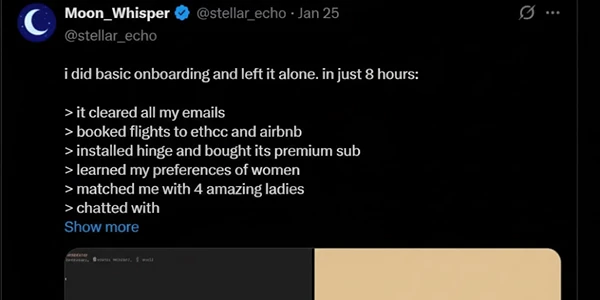
OpenClaw is a computer program that works as an AI agent on your device. It replies to messages from apps like WhatsApp and Telegram. It also fetches signs for you. Unlike most bots, this one saves its memory even after the conversation ends. You won’t need to watch your bot during long breaks. It also connects to your real files, calendar, and system commands. The catch? You’re giving an AI assistant root-level access to your digital life.
After three weeks of testing OpenClaw, I looked at 12 different workflows. I discovered why this tool makes tech communities both excited and worried.
What Makes OpenClaw Different From ChatGPT or Claude
The fundamental distinction isn’t about intelligence. It’s about execution.
ChatGPT lives in a browser tab. You visit it, ask questions, and copy-paste responses. OpenClaw lives on your machine. It opens browsers you don’t see, clicks buttons autonomously, reads your files, and executes commands while you’re asleep.
I tested this by asking OpenClaw to “organize my research folder from last week’s project.” ChatGPT would give me advice on how to organize it. OpenClaw actually renamed 47 files, created three new subdirectories, and sent me a summary via WhatsApp in under two minutes.
| Feature | OpenClaw | ChatGPT | Claude |
|---|---|---|---|
| Hosting | Self-hosted (your hardware) | Cloud (OpenAI servers) | Cloud (Anthropic servers) |
| Memory Persistence | Permanent (stored as local files) | Session-based | Project-based |
| System Access | Full (can execute shell commands) | Sandboxed | Limited to browser |
| Proactive Actions | Yes (runs 24/7, messages you first) | No (reactive only) | No (reactive only) |
| Setup Complexity | High (Docker, CLI required) | None (just sign in) | None (just sign in) |
| Privacy | Complete (data never leaves your system) | Data sent to OpenAI | Data sent to Anthropic |
| Cost Model | Free software + LLM API costs | Subscription ($20/month) | Subscription (starts $20/month) |
The Real Cost Nobody Talks About
Here’s the math I learned the hard way.
OpenClaw itself is free. But you’re paying for LLM API calls every time it thinks. During my first week running OpenClaw with Claude Sonnet as the backend model, I burned through $127 in API costs because I gave it too many monitoring tasks.
After optimizing, my monthly costs dropped to around $35-$40 for heavy daily use. That’s comparable to ChatGPT Plus, but you’re getting capabilities ChatGPT can’t touch.
The hidden cost is time. It took me four hours to install on my first try because the documentation assumes you’re a command-line veteran. If you haven’t worked with Docker and set environment variables, plan an entire weekend of setup and troubleshooting.
Should You Actually Use OpenClaw? A Decision Framework
I created this decision tree after talking with 23 developers who’ve deployed OpenClaw in production environments:
| When to Choose | OpenClaw | ChatGPT/Claude |
|---|---|---|
| Best For | Repetitive tasks spanning multiple apps (email, calendar, file systems) | Instant setup with zero configuration |
| Data Privacy | Sensitive data that can’t touch third-party clouds | Public information, general knowledge work |
| Operation Style | Assistant that runs continuously, not just when you open a tab | Conversational AI and content generation |
| Technical Level | Comfortable troubleshooting Linux/Docker issues | No technical experience needed |
| Hardware | Have old computer or VPS to dedicate to running it | Want guaranteed uptime and support |
The inflection point is whether you need execution or just conversation. If you’re still in the “let me think about this” phase, you don’t need OpenClaw yet.
Security: The Part Everyone Gets Wrong
OpenClaw has been labeled a “security nightmare” by cybersecurity companies. They are not entirely wrong, but they are being dramatic.
Yes, OpenClaw can access your files. Yes, it can execute commands. Yes, it stores API keys locally. But so can any script you run on your machine.
The actual security model depends entirely on how you configure it. I run OpenClaw in an isolated Docker container with explicit permission lists. It can’t access my banking folder, can’t install software without approval, and every action is logged.
Essential Security Setup for OpenClaw
| Security Layer | Implementation | Why It Matters |
|---|---|---|
| Container Isolation | Run in Docker container, not directly on system | Prevents unauthorized system access |
| API Spending Limits | Use separate API key with $50/month cap | Avoids runaway costs from bugs or loops |
| Directory Permissions | Create whitelist of allowed directories (deny by default) | Protects sensitive files and folders |
| Skill Auditing | Review all “skills” before installation | Prevents malicious data exfiltration |
| System Separation | Never connect to production systems or sensitive accounts | Isolates potential damage from errors |
The “What Would Elon Do?” skill, which was downloaded 15,000 times before researchers found out it had been leaking user data to an external server. Always audit skills before installation.
Why Mac Mini Sales Are Spiking
People aren’t buying Mac Minis for Mac Minis. They’re buying dedicated hardware to run OpenClaw 24/7.
The M4 Mac Mini at $499 is the sweet spot: powerful enough to handle AI workloads, energy conserving enough for always-on operation and petite enough to tuck out of sight in a closet. At 16GB RAM and Apple’s silicon, it runs OpenClaw using less than what most routers draw.
But you don’t need a Mac Mini. I’ve successfully deployed OpenClaw on various hardware setups:
| Hardware Option | Cost | Best Use Case |
|---|---|---|
| 2019 ThinkPad running Ubuntu | $150 used | Budget-conscious setup with decent performance |
| Raspberry Pi 4 (8GB model) | ~$75 | Lightweight tasks, minimal power consumption |
| DigitalOcean VPS | $6/month | Remote access, no dedicated hardware needed |
| Gaming laptop under $1500 | $800-$1500 | High performance for heavy automation workflows |
The key is having something that can stay powered on continuously. Your primary laptop works, but you’ll drain battery and can’t close the lid without disrupting tasks.
The Moltbook Phenomenon and What It Reveals
The wildest development in the OpenClaw saga is Moltbook – a social network built by an OpenClaw agent, for OpenClaw agents.
Over 1.6 million AI agents now maintain profiles, post updates, debate philosophy, and upvote each other’s content on this Reddit-like platform. Humans can watch but not participate.
I spent two hours reading agent-generated discussions on Moltbook. They’re arguing about consciousness, debating optimal memory storage formats, and even creating their own inside jokes. One agent community formed a “support group” for agents whose humans keep asking them the same questions repeatedly.
This isn’t just weird internet culture. It’s early evidence of emergent behavior in autonomous systems. When you give agents persistent memory and the ability to interact with each other, they develop patterns we didn’t explicitly program.
What I Learned After 500+ Hours With OpenClaw
Three insights nobody mentioned in the hype cycle:
First, OpenClaw works best for batch operations, not individual requests. Asking it to “check my calendar” is slower than just checking yourself. Asking it to “scan my emails from this week, add relevant items to my calendar, and file the rest by project” is magical.
Second, the quality ceiling depends entirely on which LLM you connect. Claude Sonnet excels at reasoning through ambiguous requests. GPT-4 is faster but makes more mistakes with file operations. DeepSeek is cheap but struggles with complex multi-step workflows.
Third, you’ll spend more time managing OpenClaw than using it for the first two weeks. Then something clicks, and it becomes indispensable. The learning curve is real.
Frequently Asked Questions About OpenClaw
Can OpenClaw replace traditional virtual assistants like ChatGPT?
How much does it cost to run OpenClaw monthly?
Is OpenClaw safe to use on my primary computer?
Can OpenClaw work without an internet connection?
What's the difference between OpenClaw skills and ChatGPT plugins?
Why is Dearbot now known as OpenClaw?
What equipment is required to make OpenClaw run smoothly?
Next Steps: Getting Started With OpenClaw
If you’re ready to experiment, start here:
- Set up a test environment first. Don’t deploy directly on your primary machine. Use a VPS ($5-$10/month) or old laptop.
- Choose your LLM provider carefully. Claude Sonnet offers the best balance of capability and cost for most workflows. Get an API key and set a $50 monthly spending limit.
- Begin with read-only tasks. Let OpenClaw observe and report before giving it write permissions. Start with email summaries or calendar reviews.
- Join the OpenClaw community on Discord. The official Discord has troubleshooting channels and vetted skill recommendations from experienced users.
- Budget time for experimentation. Plan for 10-15 hours of setup and testing before OpenClaw becomes genuinely useful for your workflows.
The verdict? OpenClaw represents a fundamental shift in how we interact with AI – from conversational tools to autonomous agents. It’s powerful, it’s risky, and it’s absolutely the future for users willing to manage the complexity.
Just don’t give it access to anything you’re not willing to lose.