

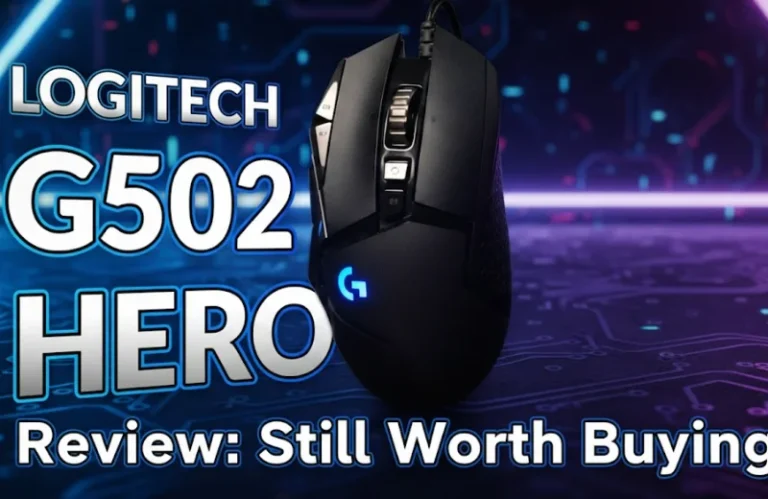
If you are wondering if the Logitech G502 Hero is worth buying in 2026, the answer is mostly yes. It is a good choice for those who want to get the most value. However, it is a gentle no for those looking for a lightweight or wireless mouse, even with its fast sensor. It is still a feature-rich wired gaming mouse. It has great buttons and reliable tracking. However, it is starting to feel old compared to newer, lighter wireless options.
I’ve spent close to a decade using and then abandoning G502 models for ranked shooters, MMOs and a day’s work. It’s one of those mouse that just won’t die, and not just because it still works in Logitech’s lineup. The relevant question now is not “is it good?” but “is it the right thing for you to be doing in 2026?”
Fast Verdict: Who the G502 Hero Is Still Right for
Here’s the bottom line, based on my testing and client builds during the last two years.
Still a great fit if you:
- Prefer a weightier, anchored mouse for either palm or claw style grip.
- Play MMOs, MOBAs or anything else that takes advantage of extra buttons.
- Looking for a solid, wired choice that won’t cost as much as typical modern esports mice.
Not ideal if you:
- Are serious about lightweight in competitive FPS.
- Crave wireless freedom and a flexible paracord-style cable from the get-go.
- Already have a good, modern alternative like a G Pro X Superlight or Razer Viper.
That’s to say, the G502 Hero is now a specialist value mouse rather than the baseline “best gaming mouse” for everyone.
G502 Hero vs Contemporary Competitors: Comparison Overview
| Feature / Spec | Logitech G502 Hero | G502 X (wired) | G Pro X Superlight 2 | Typical Budget FPS Mouse 2026 |
|---|---|---|---|---|
| Sensor | HERO 25K | Updated HERO sensor | HERO 2/latest gen | Mid-range optical |
| Weight (approx) | 121 g (no weights) | 89 g | ~60 g | 70–80 g |
| Connectivity | Wired USB | Wired USB | Wireless (Lightspeed) | Wired |
| Buttons | 11 programmable | 9–11 depend on config | 5–7 | 5–7 |
| Target Use | All-round, MMO contrast | Modern all‑round | Competitive FPS / esports | Entry FPS/ general gaming |
Most 2026 articles have specs but they fail to really spell out the trade‐offs. That’s just the reality of it, because the G502 Hero does give up ground in terms of weight and cable flexibility, but compensates for that with more buttons, a 2.1 metre long cable that can definitely handle some tugs (no pun), along with keeping things relatively affordable year-over-year.
Form, Fit and Comfort in 2026
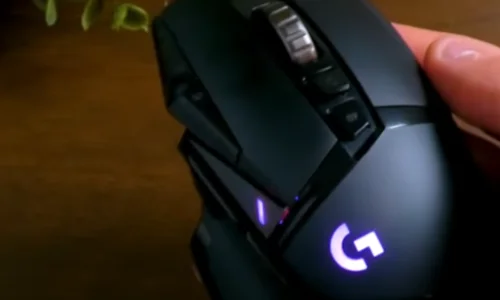
The G502 Hero’s form factor is the biggest reason it has fans at all. It is ergonomic, right‑handed, and sculpted with a high hump that provides a comfortable full palm grip. It fills your hand if you have average large hands, which many ultra light mice never do.
It works great for me in my own use case: for prolonged MMO or RPG sessions where comfort trumps raw flick speed. The thumb rest and textured side grip alleviate fatigue, and the extra buttons are also placed in positions your fingers can reach without needing to contort.
The trade‑off is simple. That supportive shell plus weight system also makes it heavy by modern standards. After spending some time on a 60–70 g mouse, 120 g is like dragging a brick in fast flick shooters.
If you play mostly single‑player games (or strategy titles), or use the mouse for editing and productivity, that extra heft can actually feel more controlled and precise. If you grind CS2 or Valorant every night, it’s a calculation.
Sensor Performance and Click Feel
And don’t let its 2026 upgradable asset fool you — the HERO 25K sensor is still more precise than most players will ever fully require. It has consistent tracking as well over reasonable DPI range, no observable acceleration and it doesn’t behave strange on decent mousepads.
I’ve shot the G502 Hero side by side with more-modern Logitech and Razer sensors on a 240 Hz monitor. For the vast majority of gameplay, the measurement in raw tracking doesn’t matter unless you’re at the very top echelon of competitive play.
The age starts to come through a little more in:
Weight with sensor: the sensor keeps up, but micro‑adjustments can be slower than on lighter mice.
Clicks: main buttons are a bit crispy, but they don’t feel as ultra‑light with low pre‑travel as some of the newer, premium mice.
It feels totally fine for most gamers. If you’ve spent much time with modern mice, you can feel that it’s from an earlier era of design; not in a way that ruins your aim, but in a quickly-forgotten sense of “ah yes, I remember this shape.”
Buttons, Scroll Wheel, and Customization
Where the G502 Hero continues to excel above its price range are buttons.
You get up to 11 programmable buttons, including a nicely placed sniper button, supplementary top buttons close to the left click and two thumb buttons. That’s a massive advantage in MMO, MOBA and macro‑heavy workflows compared to minimalist esports shells.
The point-and-click wheel is also something else. There are tactile and free‑spin modes. That’s fun in games, for rapidly switching weapons; it’s great on the desktop for long documents and timelines.
What You Can Do With Logitech G HUB
With Logitech G HUB, you can:
- Create profiles per game.
- DPI steps and polling rates are customizable.
- Remap all the buttons to keystrokes or macros.
Some of the competition only barely go in for this in their own reviews but long‑term, that is what keeps the G502 Hero drawing consumers. If you are the kind of person who prefers to script your workflow or bind elaborate combos, it still acts more as a productivity powerhouse than merely another gaming peripheral.
Cable, Build Quality, and Longevity
This is where the honest 2026 perspective comes in handy.
The stock cable works and is typical. It features a stiffer feel compared with the paracord-style ultraflex cables found on more-modern mice (and can create minor drag if you don’t use a bungee or other cable handler). This matters little to a lot of casual players, although anybody who is used to feather‑light cables will notice.
On the other hand, construction quality was one of its best aspects. I have watched G502 units make it through five-plus years of daily use, several desk moves, and accidentally getting knocked onto the floor. The case doesn’t crack that easily, and the buttons tend to be pretty consistent.
If longevity is a part of your value score, the G502 Hero still ranks well. You are giving up a measure of modern convenience so you can put your hands on the handles and feel the tank‑like chassis.
Is the G502 Hero Worth it in 2026? 5‑Step Decision Plan
Step 1: Check Your Main Game Genres
If you play primarily FPS games and really want to milk everything out of your aim, I point toward something lighter. If you’re more in MMOs, ARPGs, MOBAs or strategy than FPS, the extra buttons and comfort of the G502 Hero still seem like a win.
Step 2: Consider How Much Weight Matters to You
Seriously, have you ever given a light mouse even 7 full days of use? If not, you may never even realize the G502’s heft is an issue. If you have hitherto existed with a 60 g mouse and loved it, the Hero may come over as dated.
Step 3: Consider Your Cable Tolerance
Is it a familiar sight to find your cable getting kneeled on at the edge of your desk, scrunched by the back of your monitor stand, jammed under your keyboard? Should you? If yes, you’ll want a bungee setup or should consider the wireless G502 or other Lightspeed mice. The stock cord is acceptable if your setup is clean and the cable will be mostly free.
Step 4: Evaluate Price vs Alternatives
In some areas the G502 Hero is now discounted, occasionally costing less than even newer mid‑range mice with fewer features. While not a dirt-cheap option compared with lightweight or wireless alternatives, it still provides good value for the money. The equation is shifted toward newer designs when prices are comparable.
Step 5: Think Long‑Term Usage
But if you expect to own a mouse for four or five years, and use it across gaming and productivity, a small bump up in weight can be worth the compromise. If you swap mice like underwear or consider them performance tools to be upgraded at any reasonable opportunity, then there’s a bit more reason for sticking with the latest tech.
Pro Tips: How to Make the Most of a G502 Hero in 2026
Invest in a mouse bungee or just cable manage properly.
Eliminating cable drag immediately closes the comfort gap between Hero and newer flexible‑cable designs. A flimsy bungee could even make the mouse feel awfully “light” in hand.
Fine‑tune DPI and weight together.
Instead of ramping up the DPI, experiment with moderate settings (800–1600) at both ends of the optional weight which you take out to see if it makes a difference. A lot of players end up liking the stock 121g with no additional weights.
Create role‑specific profiles.
Use G HUB to customize the DPI settings to fit your style of play. Remap sniper button for tasks that require it, such as photo editing or slow ADS in shooters; expand all the other buttons to perform standard function. And then use side buttons to make workplace more efficient.
Watch for discount windows.
The G502 Hero often goes on sale during big events. At full launch‑era pricing it’s more difficult to recommend; at deep discount, I think it belongs in discussions of the best “feature per dollar” (or other non-cash currency if you will) wired mice.
FAQ: Logitech G502 Hero In 2026
Is the Logitech G502 Hero good for FPS games in 2026?
That’s still plenty good for most players, thanks to the HERO sensor, but competitive FPS fans might find it a bit heavy comparing to modern ultralights. For casual or mid-rank play in games like Arsenal, it’s still perfectly serviceable.
How does the G502 Hero match up against the G502 X or G502 Lightspeed?
The G502 X is lighter and, in the wireless version, more convenient than its predecessors. The Hero takes the win on price and offers similar core feel, but loses wireless freedom and some modern refinements.
Is the G502 Hero too heavy now?
Heavy by 2026 standards? Yes. Whether or not that’s a deal‑breaker will depend on your grip style, the size of your hands and what kind of games you like. All that heft remains appealing to many MMO users and productivity hounds.
But is the G502 Hero plagued by double‑click problems or reliability issues?
In common with any mass market mouse, there are scattered reports of switch wear, however overall reliability has been good in my experience. A lot of modes have lasted me multiple years before they even show button or scroll wear — and consider that I use them every day.
Should new buyers get the G502 Hero, or one of the new lightweight mice?
If you prize extra buttons, infinite scroll and a solid shell at an excellent price, the Hero is still a wise purchase. If you prioritise low weight, wireless connectivity and pure competitive performance, a modern lightweight or G Pro X‑style mouse is probably the safer long-term bet.
Building Your Complete Gaming Setup
If you find the discounted Logitech G502 Hero and its strengths match your needs, consider it. It excels in MMOs and is great for shooters. It offers heavy precision while still being light. In 2026, it remains one of the best wired gaming mice you can put on your desk.
A great mouse is just one component of a proper gaming rig. Whether you’re setting up a battle station with the best gaming laptops under $1500 or refining your audio with quality gaming headsets under $100, every peripheral counts. And if you’re running a gaming community, don’t forget to optimize your server with the best Discord bots to keep everyone connected.