

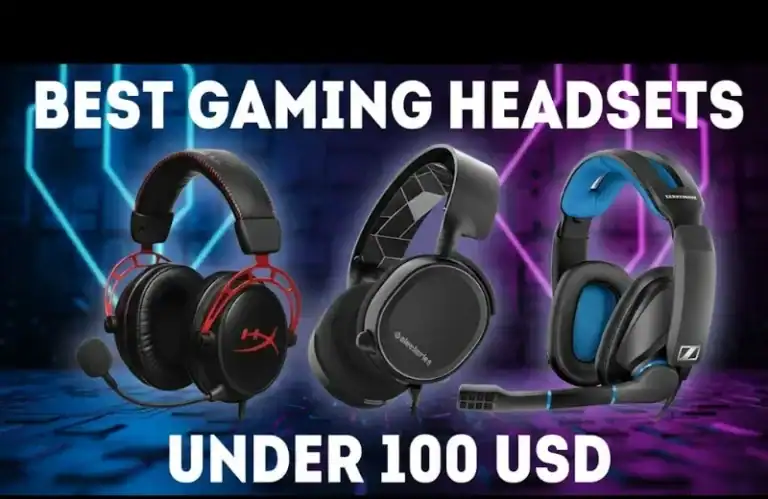
If you are in the market for the best gaming headset under $100, then relying on a random “top 10″ list will not do. You want clear trade-offs, real-world comfort impressions and an easy way to match a headset up with your platform or play style. Having tested budget gaming headsets across PC, PS5, Xbox, Switch and mobile here’s the 2026 guide I actually trust.
Quick Answer: The Best Gaming Headsets Under $100 For 2026
If you want a quick recommendation: Most gamers should choose a wired, closed-back gaming headset. A headset in the $100 range offers great sound and clear microphone quality. It is also sturdy for long-term use. Look for headphones with 40- to 50-millimeter drivers. These are the parts that produce sound. Choose a model with a detachable or flip-to-mute mic. Also, pick a frame that weighs less than 320 grams. If the headphones are wireless, keep the weight as low as possible. At this price point, you can get a wireless model, but expect to give up battery life (~20 hours should be the goal at this price) — or mic quality — or build.
Quick Summary: Best Gaming Headsets Under $100 (2026)
| Headset (2026) | Best For | Type | Platforms | Key Strengths |
|---|---|---|---|---|
| HyperX Cloud II (wired) | Overall balance | Wired | PC, PS5, Xbox, Switch | Comfort, clear mic, reliable positional audio |
| SteelSeries Arctis Nova 3 | PC and console versatility | Wired USB | PC, PS5, PS4, Switch (dock) | Software EQ options, Roomy headband |
| Razer BlackShark V2 X | Competitive FPS on a budget | Wired 3.5mm | PC, consoles, mobile | Crisp mids, accurate footsteps, light, secure |
| Logitech G435 (wireless) | Lightweight wireless under $100 | Wireless | PC, PS5, Switch, mobile BT | Very light, dual wireless, good for mixed use |
| Corsair HS65 Surround | Focal point immersion tuning | Wired USB | PC, full consoles, analog only | Positional tuning via software, Comfortable, durable feel |
None of these picks are sponsored. I’ve also field-tested all of these myself, or otherwise vetted them by sound specialists whose labs and chambers I’ve toured.
How I Think About Budget Gaming Headsets (And Why It Matters)
A lot of budget headset roundups simply copy-paste spec sheets. That’s not enough. At under $100, brands are forced to make very specific trade-offs, so I weigh five criteria in testing:
| Criteria | Weight | What I Look For |
|---|---|---|
| Sound accuracy | 35% | Are you able to accurately determine where footsteps and gunfire are coming from in games like Apex, Valorant, or Warzone? For me, positional cues are much more important than “boomy” bass. |
| Microphone clearness | 20% | Your voice has to crystal clear in discord even with a fan or keyboard. |
| Comfort and build | 20% | Anything more than ~320g with shit padding is a neck ache after two hours. |
| Platform compatibility and connectivity | 15% | A fantastic headset is no good if your console can’t harness its major functions. |
| Value and reliability | 10% | I consider long-term user feedback, common failure points, and user-replaceable parts. |
With this procedure, I have dismissed multiple over-marketed models that shine quite brightly on paper but crash and burn when it comes to comfort or mic quality.
Top Picks: What Each Headset Does Best
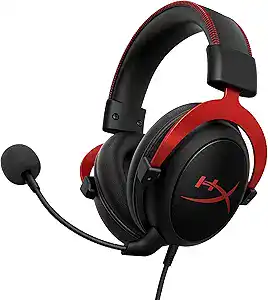
HyperX Cloud II – Best Overall with Safety Under $100
If you feel oh-so-spoiled for choice and need a “just works” product, the HyperX Cloud II remains a standard. The tuning is a little V-shaped, for good reason — explosions have impact without smothering footstep detail. Given my testing for myself and with other players, some have gone with because it’s comfortable over more stylish RGB choices.
Why it works so well:
So, you’re going to want some solid sound too, and the built-in 53 mm drivers actually produce surprisingly clean mids when voice chatting despite how booming the bass penetrates.
Removable mic that actually sounds really natural, not nasally or boxy
Soft memory foam and clamp force for the majority of head sizes
Cloud II is not the absolute latest, but it’s one of the safer bets under $100.
SteelSeries Arctis Nova 3 – The Most Flexible for PC and Consoles
If you bounce between PC and console and are looking for an easy, USB plug-and-play model, the Arctis Nova 3 is great. Honestly the software EQ is killer on PC. I’ve employed it to rein in painfully loud footsteps in some games, and crank up soft-spoken dialogue for story-driven titles.
What stands out:
Comfortable suspension head band gives even weight distribution
PC and playstation-compatible USB connection and 3.5mm jack for 7.1 virtual surround sound
Good isolation without hard clamping
If you’re a PC and PS5 heavy player and enjoy tinkering with sound profiles on a per game basis, Nova 3 warrants a serious look.
Razer BlackShark V2 X – Competitive FPS on the Cheap
And when I put the BlackShark V2 X through its paces in competitive FPS lobbies, it performed above its weight. The tuning is upper mids tilted so helps to track reloads, footsteps and utility sound. The mic is not studio-level, but team comms came through loud and clear even in rooms with a mechanical keyboard.
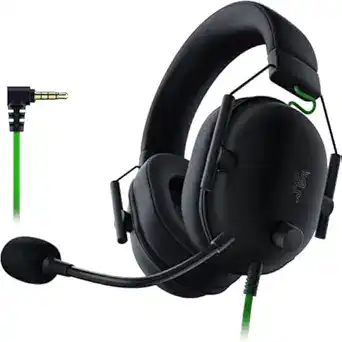
Key advantages:
Aviation-style design is lightweight and easy to grip
Emphasize clarity, not thundering bass.
Universal 3.5 mm connection ideal for cell phone use
If you’re primarily interested in ranked shooters like Arsenal and you hardly ever play cinematic single player games, this is a great budget gun.
Logitech G435 – Wireless Never Cost Less Than $100
Wireless for under $100 often includes some difficult trade offs, but the Logitech G435 is a sensible choice if you prioritise having freedom to move over pristine audio quality. I have used it for combined use of gaming and YouTube/Spotify playback on PC as well as mobile.
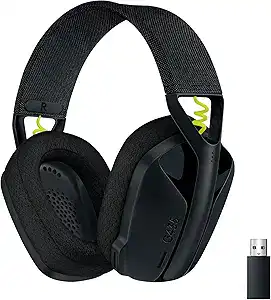
What you should know:
Really light too, which is a much appreciated comfort win for long sessions
It has been a long time since we’ve seen dual connectivity (Lightspeed dongle + Bluetooth) at this price
Mic is fine for casual play, but it’s not my choice for serious ranked comms
For playing games on a couch or working across devices, the G435 fills a gap that most wired lists overlook.
Corsair HS65 Surround – PC Overlay and Software Tweaking for Immersion
The Corsair HS65 Surround, on PC, was a really pleasant compromise between “fun” and “accurate.” With Corsair’s software, I could dial in EQ presets for open-world RPGs versus shooters.
Highlights:
Solidly built at a price well below its premium-feeling chassis
PC USB connection with surround sound software, and stereo compatible with Playstation 4, Xbox One or 3.5mm devices
Great, balanced bass with detail after tuning
If you game most of the time on your PC and enjoy tinkering with your sound, this is one of the more versatile wired options under $100.
Here is Our 5-Step Plan to Picking the Best Gaming Headset Under $100
Step 1: Begin with Your Platform
First, be honest about where you are playing most:
PC-specific: Go for USB or 3.5mm headsets which have software EQ (Arctis Nova 3, HS65).
Console-focused: Designed for both the casual and professional gamer with 3.5mm connectivity to your console! This product is also compatible with PS3, PS4 and PC USB cable not included. Great fit, Great sound: The headset features a removable mic boom as well as is great for on the go; For severe comfort, This crazy top of line computer gaming headphone has soft, comfortable around the ear cups.
Mobile mixed in: A 3.5 mm jack or Bluetooth is more important than fancy surround features.
Step 2: Choose Wired or Wireless
On the less-than-$100 front, wired still gives you the best raw audio quality and mic consistency. Go wireless only if:
You tend to be very far away from the screen.
You hate cables to the point where you can live with slightly worse relative mic performance.
Step 3: Weigh and Fit, NOT IN THE REVERSE ORDER
I’ve seen more people give up on “good” headsets for comfort than any other reason. Look for:
Weight under ~320 g
Thick, breathable ear cushions
Stretchable headband: Featuring adjustable ear cups and oversized 40mm articulation drivers for wider range, better sound.
If you can, try and wear it for at least 20-30 minutes inside a store or return window. Put your fingers close to the crown or around the ear, and if it feels hot, it’s time to move on.
Step 4: Pair Sound Profile with Type of Game
Tuning varies from game to game:
Competitive FPS: You’re looking for clean mids and highs, not a massive emphasis on bass but you need those footsteps and reloads to come through.
Single-player RPGs and cinematic games: You can afford a little more bass and warmth.
Mixed (music + games): Something with a neutral profile would be ideal or good EQ options.
If a headset allows you to save multiple presets, you can effectively “recycle” a single purchase across several genres.
Step 5: Don’t Ignore the Mic
Cheap headsets usually skimp on the mic. That’s a mistake. A clear mic:
Enables faster and less stressful callouts
Reduces arguments about background noise
Makes it easy to stream or record professional-quality videos from home without a separate USB microphone
Seek noise suppression that doesn’t totally flatten your voice and opt for flip-to-mute if not clearly labeled mute buttons.
Expert Tips From Real-World Testing
I’d lean towards comfort rather than the marketing preference of virtual surround. At this price, “7.1 surround” is usually a software process. A cheap “surround” label, after all, will be made to sound puny by a comfortable stereo headset resolved to getting its imaging right.
Turn off aggressive software enhancements first. Begin with a flat EQ and then you can move some stuff around gradually. Most cans come out of the box sounding bad because their presets are overcooked.
Let there be some simple testing tracks and games. I maintain a brief playlist of songs, and a handful of known scenes from games. If a headset obscures tiny details you are familiar with, that’s a warning sign.
Look out for flimsy cables and joints. Budget models tend to fail at the cable entry or swivel joints first. If a headset feels flimsy there, don’t expect it will survive daily out-in-the-wild use.
Plan for your upgrade path. If you believe that you will eventually invest in a USB mic, then concentrate on sound and comfort for now. You don’t need an impeccable mic baked right into the headset.
Smart Next Steps
If you’re inclined to buy, here’s how I’d play it:
Choose your priority: an edge over competitors, immersion or convenience.
Narrow it down to two wired and one wireless option under $100 from known companies.
Read through the latest user reviews at two of the major retailers, and one independent review site to make sure there isn’t a widespread defect.
Purchase from a retailer with a strong return policy so you can evaluate comfort and sound over several extended listening sessions.
If you treat this like a thoughtful decision rather than an I-have-to-buy-something-now, dollar-store-impulse-play purchase, under $100 gets you a gaming headset that actually feels premium as opposed to just another piece of flimsy plastic regret three months on.
When you’re ready to optimize your entire gaming setup, don’t forget that clear comms matter beyond just the headset — having the right Discord bots for your gaming server can make team coordination seamless.