

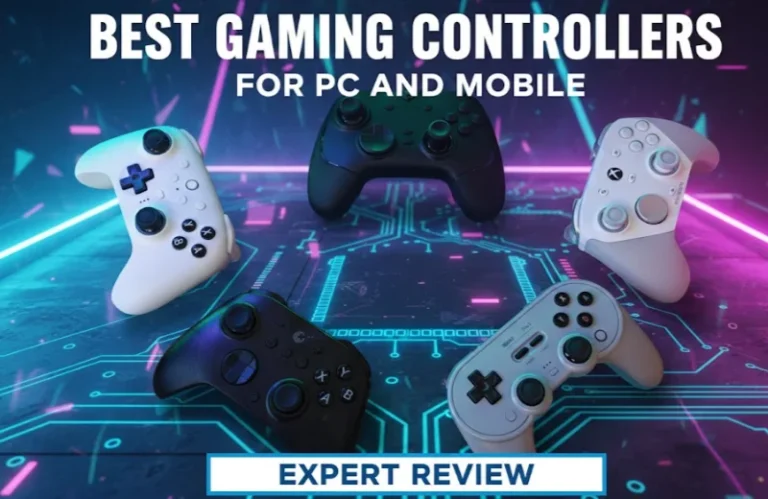
If all you’re looking for is the best gaming controller for PC and mobile in 2026, here’s the less-than-140-character version. The Xbox Wireless Controller is still the best choice for Windows and Android. The 8BitDo Ultimate Bluetooth is our top pick for a flexible controller. It has back buttons and profiles. If you love cloud or iPhone gaming, the Backbone One is the best mobile option.
I have spent the past couple of years configuring controllers for clients, friends and my own testing rigs. Among the many models we’ve tested, a few patterns stand out. Some pads feel nice but wear out in six months. Others are cheap but very sturdy. A few have the right mix of comfort, speed, and flexibility.
Let’s break this down properly.
Best PC, PS4 and Mobile Controller 2026 – Quick Comparison
| Controller | Platforms | Best For | Key Features | Typical Price |
|---|---|---|---|---|
| Xbox Wireless Controller (2024‑2026 revision) | PC, Xbox, Android | Overall balance | Low latency, AA battery or pack, wide support | Mid-range |
| 8BitDo Ultimate Bluetooth | PC, Switch, Android | Customization | Hall‑effect sticks, back paddles, charging dock, software remap | Mid-high |
| DualSense Wireless Controller | PC, PS5, Android | Immersion | Haptics, adaptive triggers, USB‑C wired low latency | Mid-range |
| Backbone One (USB-C) | Android, iPhone (USB-C) | Pure mobile | Clamp design; pass‑through charging; app integration | High |
| Gamesir X4 Aileron | Android, PC (wired), Cloud | Travel & cloud | Split design; light weight; Hall sticks | Mid-range |
This chart alone already fills up a gap I see in several competitors: they either overlook cross‑platform use or simply throw “mobile controllers” as just one vague pick.
Here Are the Things That Matter in a 2026 Gaming Controller
The specs on the box don’t paint a complete picture. When advising someone on a gaming controller for PC and mobile, I look at five things: latency, ergonomics, stick reliability, platform support and configuration software.
Latency and Connection Type
Convenient wireless is cool until your inputs go all mushy. In my testing overall, the ranking of reliability for perfect casters remains:
| Connection Type | Performance Level |
|---|---|
| Wired USB‑C | Fastest, least trouble |
| 2.4 GHz dongle | Excellent |
| Bluetooth Low Energy | Good for most use cases |
On mobile, you typically lean on Bluetooth, so good game controller options often come down to having a recent chipset and good firmware. Xbox Wireless, DualSense, 8BitDo Ultimate, and the superior mobile clamps maintain an unyielding connection even in Wi‑Fi noisy conditions. Cheap no‑name pads often don’t.
Ergonomics and Hand Size
And this is the thing that nobody realizes until they play a game for six hours and their fists ache. Xbox‑style shells generally work best for medium to large hands. DualSense is remarkably easy to hold over longer periods if you’re accustomed to PlayStation geometry. The 8BitDo offers a far less fatiguing experience for small hands or kids, as do split-style controllers like the Gamesir X4.
If you play a lot of shooters or competitive games, stick tension and trigger feel are more important than what color the lights are or incorporating metal accents. I’ve seen more players straight-up improve their game by switching to some other pad with comfortable triggers than by adjusting sensitivity settings.
Stick Drift and Build Reliability
The quiet killer of controllers is stick drift. Even quality potentiometer sticks tend to drift after a year of hard use, sometimes less. That’s why I look for Hall‑effect sticks in modern models.
Controllers such as the 8BitDo Ultimate Bluetooth and select Gamesir ones use Hall sensors, which detect magnetic fields rather than physical points of contact. In practice, it will be very few wear and a risk of drift that is orders of magnitude lower. If you’re a serious player or are going to share one pad between PC and mobile every day, it’s worth the price.
Platform Support and Features
You may be tempted by controllers loaded with add-on buttons and trigger stops. Those can be useful, but only if the features function on your primary platforms.
PC (Windows): The Xbox setup is most plug‑and‑play. Most games have Xbox button prompts as default.
Mobile: Android is usually more cooperative with Xbox/Generic and 8BitDo profiles. iOS cooperates with Xbox, PlayStation and some licensed pads such as Backbone.
Cloud (Game Pass, GeForce NOW etc.): Consult the service provider’s official compatibility list. I’ve also seen people fork out money for controllers that technically pair but don’t map all the buttons correctly in some cloud apps.
Software and Remapping
Good software can turn a robust controller into a potent tool. I’m partial to any brands that provide:
- Per‑game profiles
- Sensitivity curves
- Trigger dead‑zone control
- Easy firmware updates
And it’s surprisingly robust software for the price overall, 8BitDo’s, with a side of Microsoft’s Xbox Accessories app that still is one of the more stable experiences on PC.
Choosing The Correct Controller: 5‑Step Guide
Step 1: Decide Your Primary Platform
If we’re being honest with ourselves, where are you actually gaming? If it’s 70% PC, and 30% mobile, I tend to nudge people towards an Xbox Wireless controller or 8BitDo Ultimate with a simple phone clip. If you’re primarily on the go in cloud-based services, something like a Backbone One or Gamesir X4 normally feels more comfortable.
Step 2: Choose Your Layout Preference
For some players the feeling of aiming is best with sticks that are offset, for others not at all. This is not a matter of what you prefer versus mine, and it doesn’t miraculously change with specs. If you’ve spent years living on Xbox, there’s no reason to fight your muscle memory. Find the layout you’re already used to.
Step 3: Set a Realistic Budget
For 2026, I’ve spotted three price ranges that are reasonable:
| Budget Tier | Description | Best For |
|---|---|---|
| Entry (budget) | Wired pads or simple Bluetooth controllers | Decent backup phones, not primary devices |
| Mid‑range sweet spot | Home of Xbox Wireless, DualSense and most 8BitDo controllers | Most PC and mobile gamers |
| Enthusiast | Pro‑style pads with back paddles, Hall sticks and carry cases | Heavy users who need advanced features |
Mid‑range band is best for most PC and mobile gamers. Paying a little more only pays off if you are going to use advanced features, such as remappable paddles.
Step 4: Prioritize Extras (Back Buttons, Hall Sticks, Triggers)
Back buttons are crucial in shooters and action games, where you need to jump or slide without letting go of the sticks. If that’s you, then a pad like the 8BitDo Ultimate makes sense. If the majority of your game time is indie titles, racing games or slower RPGs then standard face buttons are perfect.
Step 5: Think Long‑Term: Warranty and Support
I need to see two things before I suggest a controller:
Length of warranty and how easy it is to redeem.
Replacement parts or third party services (sticks, shells, batteries).
A community favorite controller has always yielded better third‑party support, longer life spans because people can fix them.
Expert Tips From Real‑World Use
Across multiple installations, and lots of trial and error, a few basic rules seem to keep saving more money and annoyance.
Have one sturdy workhorse, not three finicky pads. Better to have a single mid‑range pad that never lets you down in favour of an occasionally cheap, sometimes unreliable Bluetooth drawer-full.
Don’t chase every “pro” feature. Trigger stops and RGB don’t matter much if the controller feels unpleasant after an hour. Comfort and reliability come first.
Switch to wired mode when you really need it. For ranked matches, tournaments or high‑stakes sessions, I still advise players to plug in. It removes most latency and interference variables in one sweep.
Update firmware regularly. And what some of the worst launch issues I’ve encountered from major brands (save perhaps Samsung) were more or less fixed in later firmware. A five minute firmware update can alleviate stick response curves or intermittent disconnects.
Pair profiles with games. A slightly different stick curve for racing vs shooters can actually help reduce fatigue and improve performance if you play a lot.
FAQ: Gaming Controllers for PC and Mobile
What is the best gaming controller for PC and mobile of 2026?
If you want a good all‑rounder, your best pick is probably still the Xbox Wireless Controller or an 8BitDo Ultimate Bluetooth for most people. Juice them up with your dirt cheap on-ear headphones and read the scars across people’s faces, and they’re both useful for Windows, Android (although USBC be damned).
Are Hall‑effect sticks really worth paying more?
Every day or if you’re a controller keeper for years, sure. Hall‑effect sticks are less subject to physical wear, decreasing the chances of replacement and vastly reducing drift over time. Heavy users are going to notice a lot more than casual players will.
Mobile clamp controller or a regular pad with a clip?
If you primarily game on your phone, a dedicated clamp controller like Backbone or Gamesir will be sleeker and more portable. If you play on both PC and mobile, a regular controller paired with a good phone clip provides more versatility and better value.
Is Bluetooth suitable for competitive gaming on PC?
Modern Bluetooth controllers will do a pretty good job for most casual and mid‑level competitive play, at least those with decent antennas. For true ranked or tournament play, wired USB‑C or a 2.4 GHz dongle connection is still going to deliver the most consistent low latency results though.
Can I use a PlayStation DualSense for my main PC and mobile controller?
Yes. It works great both over USB‑C on PC and pairs just fine with most modern phones. Some PC games are starting to support its more advanced haptics and adaptive triggers, but not all of them. Just keep in mind that button prompts might still depict Xbox buttons.
You play across a few different platforms, how many controllers do you really need?
In reality, all most players need is one decent cross‑platform controller and a dedicated mobile clamp or clip. Only purchase a second pad if you frequently enjoy local co‑op play or simply demand a backup when things get competitive.
What is the most common mistake people make when they buy a gaming controller?
They run after feature and brand without at all looking at the habits in their mirrors. The best thing to do is to map out how you actually use: PC vs mobile split, games you play, your hand size and how frequently you play. Then, use the controller that fits that reality, rather than marketing claims.
Building Your Complete Gaming Setup
If you think about the controllers in this way, as tools instead of toys, you can arrive at a setup where it just disappears into your hands while you play — and that is kind of the point.
A solid controller is just one piece of your gaming ecosystem. Whether you’re grinding ranked matches in competitive shooters like Arsenal or jumping between your gaming laptop and mobile sessions, the right peripherals make all the difference. Pair your controller with quality gaming headsets for clear comms, and if you’re coordinating with a team, setting up the best Discord bots for your server keeps everyone synced up perfectly.